
Speak My SMS1.2 - Google Play
You'll be able to see results in few seconds.
Publisher Description
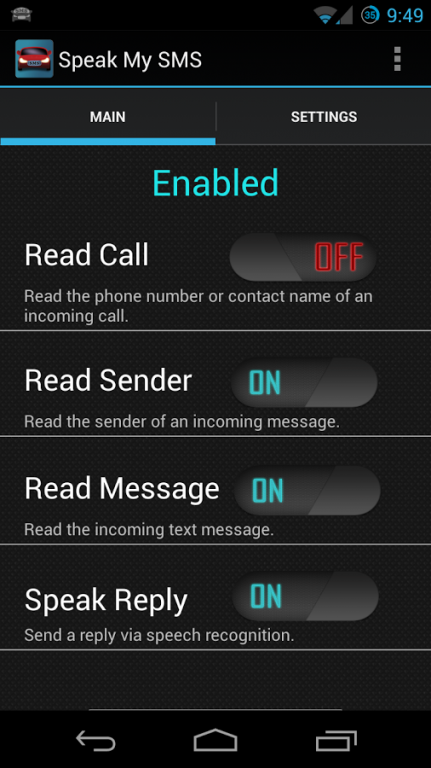
Do you want to hear and reply to your text messages without touching your phone? Speak My SMS will read your incoming messages based on easy to configure settings. Using a very simple easy to use interface, you can set conditions for when you want the app active.
Features:
- CONDITION BASED: Ability to set up conditions for when the app is active.
- BATTERY EFFICIENT: Drains little to no battery. Does not run until you receive a text message.
- CUSTOMIZABLE: Change the way Speak My SMS works with many customizable features.
★ Hear incoming SMS sender and/or message
★ Reply to message easily with speech recognition
★ Hear caller name/phone number during incoming phone calls
★ Self activation based on headphones, Bluetooth, music, USB power, and screen state.
- Speaks and accepts speech via Bluetooth headsets
- Easy to use quick toggle widget
- Works great with music and videos
- Great solution for answering an important text while driving.
- Low memory and system resource usage
- In call detection
- Supports SMS encryption app, TextSecure
- Smart and very easy to use
- A perfect driving assistant
Compatible with other messaging apps like GoSMS, Chomp SMS, and Handcent SMS.
Don't want to deal with any settings? Don't worry! Just press the start button and the app will take care of the rest.
If you use Go SMS for your SMS messaging, make sure the "Disable Other Message Notification" setting is disabled.
I care about your privacy as much as I care about mine. Speak My SMS does not have any internet permissions and your personal data will not leave your device.
About Speak My SMS
The company that develops Speak My SMS is Dry Ice Droid. The latest version released by its developer is 1.2.
To install Speak My SMS on your Android device, just click the green Continue To App button above to start the installation process. The app is listed on our website since 2013-07-27 and was downloaded 0 times. We have already checked if the download link is safe, however for your own protection we recommend that you scan the downloaded app with your antivirus. Your antivirus may detect the Speak My SMS as malware as malware if the download link to com.did.speaksms is broken.
How to install Speak My SMS on your Android device:
- Click on the Continue To App button on our website. This will redirect you to Google Play.
- Once the Speak My SMS is shown in the Google Play listing of your Android device, you can start its download and installation. Tap on the Install button located below the search bar and to the right of the app icon.
- A pop-up window with the permissions required by Speak My SMS will be shown. Click on Accept to continue the process.
- Speak My SMS will be downloaded onto your device, displaying a progress. Once the download completes, the installation will start and you'll get a notification after the installation is finished.
Program Details
System requirements
Download information
Pricing
Version History
version 1.2
posted on 2013-07-27
Version 1.2,-Fixed issue with Bluetooth on some Ice Cream Sandwich devices. New BROADCAST_STICKY permission,-Added UK English language.,-Added a check for TTS on first launch.,-A few other small changes and optimizations.,Version 1.1,-Added easy to use widget,-Added speech for incoming calls. Your phone will announce who is calling you.,-Added ability to read incoming SMS messages with encryption apps like TextSecure,-Punctuation improvements on speech reply,-Other small tweaks and improvements
version 1.0
posted on 2013-07-08
Several fixes and updates
Disclaimer
Official Google Play Link
We do not host Speak My SMS on our servers. We did not scan it for viruses, adware, spyware or other type of malware. This app is hosted by Google and passed their terms and conditions to be listed there. We recommend caution when installing it.
The Google Play link for Speak My SMS is provided to you by apps112.com without any warranties, representations or guarantees of any kind, so access it at your own risk.
If you have questions regarding this particular app contact the publisher directly. For questions about the functionalities of apps112.com contact us.
